PDFs are great for sharing, but not always ideal when you need to edit, reuse, or repurpose content. Whether you want to turn a PDF into a Word file, an image, an Excel sheet, a PowerPoint, or vice versa, converting PDFs is one of the most efficient ways to streamline your workflow.
From business documents to school projects, knowing how to convert a PDF can save you time and make your files more flexible. This guide shows you a clear, practical way to help you convert PDFs, and other formats, effortlessly.
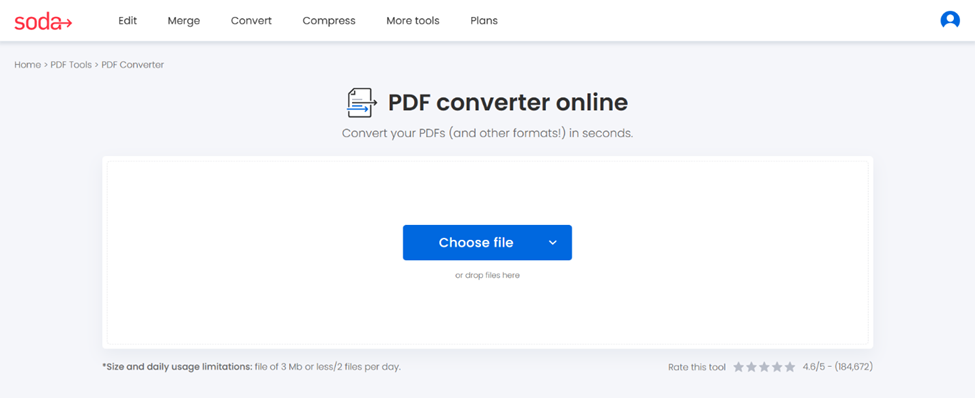
Step 1: Select and upload your document
Start the conversion by loading the file into the tool.
- Open Soda PDF’s converter
- Upload your document
Drag and drop your file, or upload it into the box from your device, Google Drive, or Dropbox.
- Word
- Excel
- PowerPoint
- Image
- HTML
💡As an HR professional, you might need to convert a PDF contract into a Word document to make multiple changes.
Step 2: Choose the format of your choice
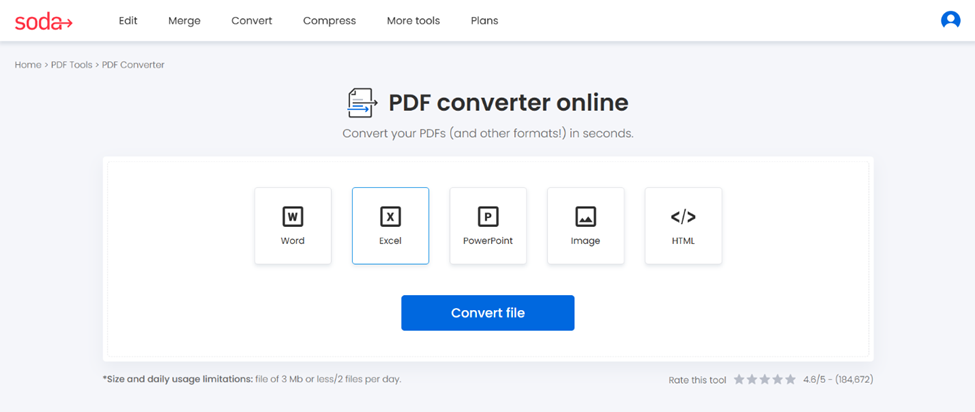
This is where you choose the format to convert your document into.
- PDF ➡️ Word (.docx): best for editing text-heavy documents
- PDF ➡️ Excel (.xlsx): useful for tables, invoices, and financial data
- PDF ➡️ PowerPoint (.pptx): handy for presentations
- PDF ➡️ Image (JPG/PNG): ideal for graphics or sharing individual pages
- PDF ➡️ HTML (.txt): great for simple text extraction
- PDF ➡️ PDF: for long-term archiving and compliance
Select the format that matches your goal, then click on Convert file for converting.
💡As an entrepreneur, converting a scanned receipt into Excel to extract totals automatically makes you save a lot of time.
Step 3: Download your new file
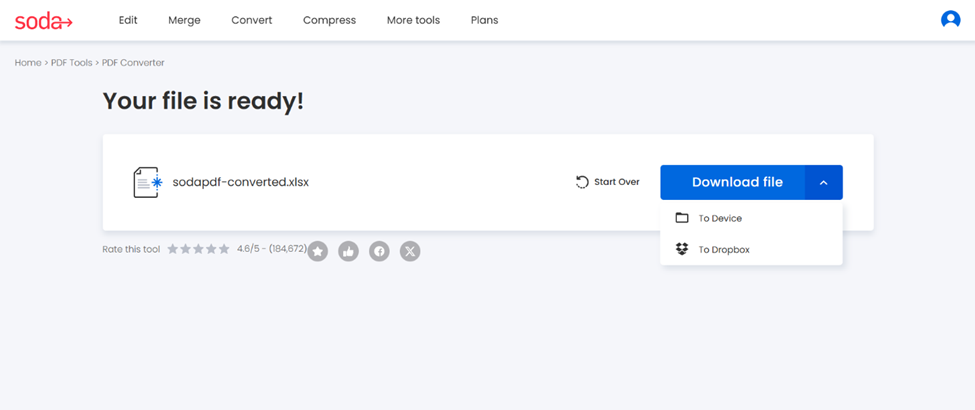
Once the conversion is complete and your file is ready, download the document:
- To your device
Save it with a clear, descriptive file name. - To Dropbox
Save your new file to the cloud
💡As a student, converting a PDF resumé to Word is an easy way to update your experience.
Ready to convert your PDF, or another format?
Whether you’re turning a contract into an editable Word file, extracting data from a scanned invoice, or converting a report to a PowerPoint, our PDF converter helps every professional work faster and more efficiently.
✨ Convert PDFs or another format effortlessly with our PDF converter tool.
🔍 Would you like to know about our other features? Explore our full range of tools.