A filled-out CMS-1500, with every box explained
A CMS-1500, also called Form 1500, is a professional health-insurance claim form. This filled-out CMS-1500 example shows how its main boxes connect—from coverage and patient details at the top to services, charges, and provider information below. Use it as a visual orientation tool, not as instructions for filing a real claim.
Open the form in your browser, type your answers, and download the finished PDF.
Your file stays private and is deleted from our servers within 24 hours.
How to use this CMS-1500 example
The completed form on this page uses one simple fictional scenario: Alex Sample is both the patient and policyholder for a group health plan and has one office visit on March 12, 2026. The sample shows one diagnosis, one service line, a $150 total charge, and no payment received. Those details make the layout easier to follow; they do not establish billing, coding, eligibility, payment, or submission rules for another claim.
The sample is educational only
All names, organizations, account details, provider identifiers, tax identifiers, and ZIP codes in the sample are fictional or deliberately invalid placeholders. Do not submit the sample or copy its entries into an actual claim.
The form is arranged in two broad areas: patient and insured information in items 1–23, followed by physician or supplier information in items 24–33. That structure is a useful way to approach the sample. First identify whose coverage and care the claim describes; then follow the diagnosis and service information down to the amount and provider areas. For rules that are not apparent from the printed labels, the form directs readers to the NUCC Instruction Manual. Use that manual and the applicable payer or program instructions when completing a real claim.
See the completed CMS-1500 sample
Start with the annotated form below. Its six callouts trace one claim from the coverage and identity area through the diagnosis and first service row, then down to the total and billing-practice information. The image uses one straightforward scenario so the relationships are visible without suggesting that every claim is completed the same way.
A filled-out CMS-1500 example
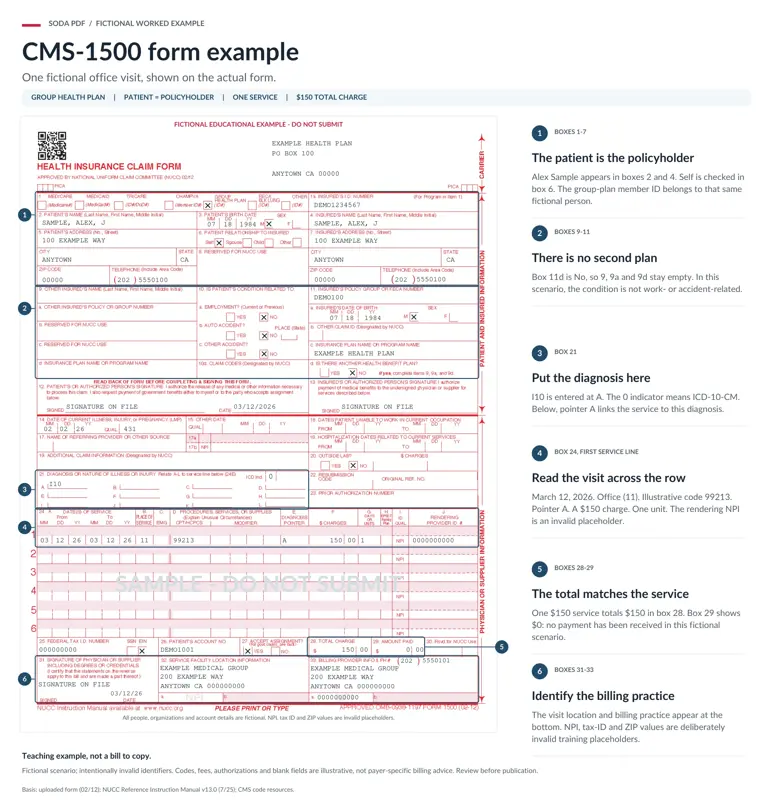
Fictional CMS-1500 example showing one office visit and how the main fields connect. Educational example only — do not submit.
All people, organizations, account details, provider identifiers, tax identifiers and ZIP codes shown in this example are fictional or deliberately invalid placeholders. The example is for educational purposes and is not payer-specific billing advice.
Boxes 1–7: the selected plan, patient details, insured details, and the patient-to-insured relationship.
Boxes 9–11: whether another health benefit plan is involved.
Box 21 and the first box 24 service row: the diagnosis-letter and diagnosis-pointer connection.
Boxes 28–29 and 31–33: the scenario-specific amount area and the facility and billing-provider area.
In this scenario, Alex Sample appears as both the patient and the insured person, so “Self” is selected for the patient’s relationship to the insured. Item 11d is marked No, so the other-insured fields are empty. The condition is also shown as unrelated to employment, an auto accident, or another accident. These are facts of the fictional scenario, not answers to reuse for another person.
The sample also makes two form relationships easy to see. Diagnosis I10 appears at letter A in item 21, and the first service row points to A. That row’s $150 charge is shown again as the $150 total charge in item 28. The diagnosis and procedure entries are illustrative only, and every identifier in the image is an invalid placeholder rather than billing advice.
Patient, insured, and other-coverage boxes: items 1–13
Read the upper part of the form as a coverage-and-identity map, not as unrelated blanks. Items 1 and 1a pair the selected insurance program with the insured’s ID number. Items 2, 3, and 5 collect patient details, while items 4 and 7 separately identify the insured person. Item 6 supplies the relationship choices that connect those two people.
Why items 1–7 separate the patient from the insured
The sample shows the simplest version of this relationship: the patient is the policyholder. Alex Sample therefore appears in both the patient and insured areas, and “Self” is checked in item 6. Other claims can involve different people, which is why the form keeps separate patient and insured name and address fields. The layout preserves that distinction; it does not decide who is eligible or which coverage rules apply.
Item 10 asks three separate Yes/No questions: whether the condition is related to current or previous employment, an auto accident, or another accident. The auto-accident question also includes a place (state) field. Treat these as separate questions rather than one general accident question. Item 10d is designated by NUCC, so this example does not present it as an ordinary reader-completed field.
The item 11d route for another health benefit coverage
Item 11d contains one of the form’s clearest instructions. It asks whether there is another health benefit plan and, if the answer is Yes, directs you to complete items 9, 9a, and 9d. Those locations ask for the other insured’s name, policy or group number, and insurance plan or program name. In the fictional sample, item 11d is No, so those fields remain empty.
The form’s explicit other-coverage route
Item 11d answer | Next step |
|---|---|
Yes | Complete items 9, 9a, and 9d. |
No | The form does not trigger that instruction. |
Some nearby boxes are reserved for NUCC use, including items 8, 9b, and 9c. Items 12 and 13 contain authorization language about releasing information and authorizing payment. Because signer and completion requirements depend on the printed terms and applicable instructions, do not imitate a signature from a fictional example. The form says to read the back before completing and signing it.
Diagnosis and service lines: items 14–24
The middle of the form moves from claim context into diagnosis and service information. Items 14–20 include labeled locations for dates, a referring provider or other source, additional claim information, hospitalization dates, and outside-lab information. Items 22 and 23 are separately labeled for resubmission and prior authorization. A field label tells you where that kind of information belongs; it does not establish when the field applies or what detailed coding rules govern it. Use the NUCC Instruction Manual and applicable payer or program instructions for those decisions.
How item 21 connects to item 24E
Item 21 is more than a diagnosis list. It provides lettered positions A through L and explicitly says to relate those entries to the service line below at item 24E. In practical terms, item 21 supplies the lettered diagnosis reference, and the diagnosis-pointer location in each relevant service row makes the form’s stated connection to that reference.
The example makes the cross-reference concrete: I10 appears at diagnosis A, and the first service row uses pointer A. That shows the form’s visible relationship only. It does not tell you which diagnosis or procedure code belongs on a particular real claim, how many pointers to use, or how a payer evaluates a submission.
Read one service line across
Item 24 is a repeated horizontal row structure. Each line brings together dates of service, place of service, procedures, services or supplies, a diagnosis pointer, charges, units, and rendering-provider information. Reading across the row is more useful than treating each narrow column as an isolated question: it is one record of a service and the information connected to that service.
In the approved fictional scenario, the first row shows a March 12, 2026 office visit, place of service 11, illustrative procedure code 99213, diagnosis pointer A, a $150 charge, and one unit. The rendering-provider identifier is deliberately invalid. These entries teach where connected facts appear in a row; they are not standard values or completion instructions for another claim.
Charges and provider information: items 25–33
The bottom section closes the visible claim layout. Items 25–30 include the federal tax ID, patient account number, accept-assignment question, total charge, amount paid, and a field reserved for NUCC use. Items 31–33 identify the physician or supplier signature area, service facility location, and billing provider information.
Why the example’s item 28 total is $150
The sample has one illustrated service line with a $150 charge. For that fictional scenario, item 28 also shows $150 as the total charge, while item 29 shows $0 because no payment has been received. This creates a helpful visual chain from the service row to the lower amount area, but it is not a general claim-total formula. The supplied form labels item 28 as total charge and item 29 as amount paid; it does not provide a universal arithmetic rule for every claim.
Sample figures are not billing rules
Do not use the example’s $150, $0, tax information, provider details, or placeholder identifiers as inputs for a real claim. Item 30 is reserved for NUCC use, and actual amount and provider entries require applicable instructions.
The sample’s bottom boxes identify a fictional service facility and billing practice, Example Medical Group. Provider identifiers, tax identifiers, and ZIP values in the image are deliberately invalid training placeholders. The signature area includes a printed certification statement, so it should be handled under the form’s terms and applicable instructions rather than copied from the example.
When this example is not enough
Can I submit this filled-out CMS-1500 example?
No. The example is fictional, educational, and built with deliberately invalid placeholders. It shows how major boxes connect in one simple scenario; it is not a claim to submit or a substitute for payer-specific completion requirements.
Where do I find detailed CMS-1500 box instructions?
Use the NUCC Instruction Manual named in the form footer, along with the payer- and program-specific instructions that apply to the claim. This is where to resolve questions the visible labels cannot safely answer, including detailed coding, authorization, signature, eligibility, and amount requirements.
A paper-form example is not a complete electronic-submission procedure. CMS says providers may submit claims electronically to a Medicare carrier, DMEMAC, or A/B MAC when applicable electronic-filing requirements are met, and CMS explains that electronic claims undergo edits. For a real Medicare electronic claim, follow CMS and the applicable contractor instructions.
For other government form instructions and filled examples, browse the government form instructions and filled examples hub.
Sources and how this page was made
This guide explains the official sources listed below in plain language. Displayed amounts, limits, percentages, and timing rules come from that material.