A filled-out UB-04 (hospital claim), with every box explained
A UB-04, also called CMS-1450, is an institutional provider claim—not a patient invoice or a general-purpose medical form. This fictional filled-out example shows how one outpatient claim connects the provider, patient, service, charge, payer, diagnosis, and provider fields. Use it as a visual map, then use current payer, MAC, and NUBC instructions to prepare a real claim.
Open the form in your browser, type your answers, and download the finished PDF.
Your file stays private and is deleted from our servers within 24 hours.
What the UB-04 is—and when this sample helps
The UB-04 is the standard paper claim form institutional providers use to bill Medicare Administrative Contractors when paper filing is permitted. It is also a uniform institutional bill used with other third-party payers. The related 837I is the standard electronic institutional claim format, so the paper form and electronic claim draw on related institutional billing information.
This completed form is deliberately fictional. Its one-day outpatient scenario helps you see how field groups fit together; it does not authorize its bill type, codes, identifiers, charge, or payer details for another claim. A payer may not need every UB-04 data element, and CMS identifies some printed fields as unused, not required, or situational.
Paper filing is an exception-based route
For Medicare, initial claims generally must be submitted electronically unless an ASCA exception or waiver applies. Seeing a paper UB-04 example does not mean a paper claim is the right submission route.
See a completed UB-04 example
The sample below follows one fictional hospital outpatient clinic visit for Alex Sample on March 12, 2026. It contains one service line: revenue code 0510 with HCPCS G0463, one unit, and a $650 charge. The 0001 line also shows $650 because it is the grand total of this one billed line. The payer line shows Example Health Plan and no prior payment.
A filled-out UB-04 hospital claim example
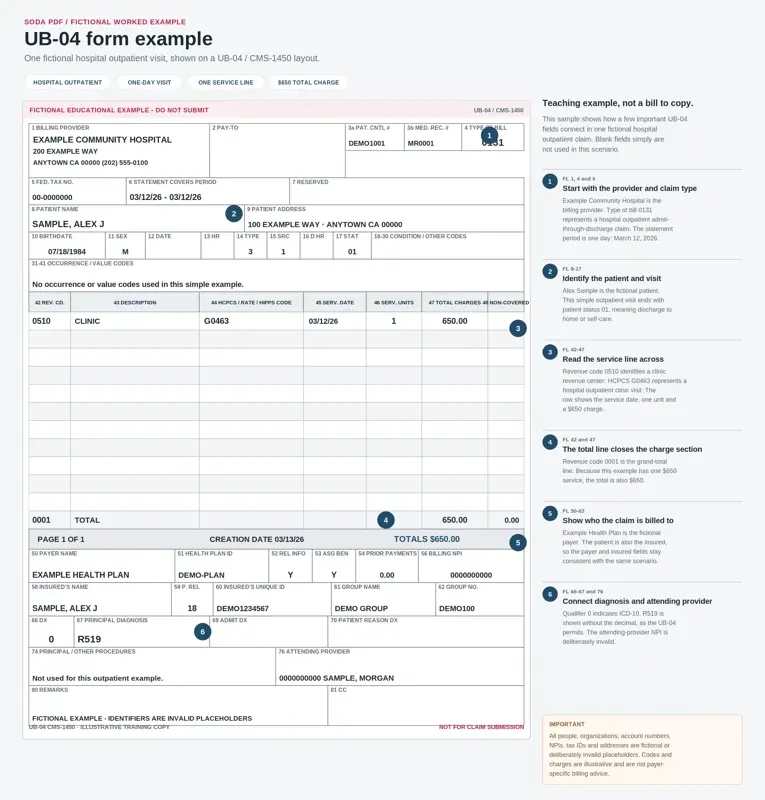
Fictional UB-04 example showing one hospital outpatient clinic visit and how the main claim fields connect. Educational example only - do not submit.
All people, organizations, account details, provider identifiers, tax identifiers and addresses shown in this example are fictional or deliberately invalid placeholders. Codes and charges are illustrative and are not payer-specific billing advice.
Read the annotations as connections, not as entries to copy. The upper fields establish whose claim and which episode this is. The center grid records the service and its charge. The lower areas identify coverage, diagnosis, and applicable responsible providers. The following sections explain those connections in that order.
Start with the provider, bill type, patient, and visit
The top of the UB-04 makes the rest of the claim intelligible. FL 1 identifies the billing provider. FL 3a is the provider’s patient control number, used to retrieve the provider’s financial record; FL 3b is a separate medical or health-record number when applicable. They are not interchangeable. FL 5 holds the federal tax number, and FL 6 gives the beginning and ending dates of the statement period in MMDDYY format.
Why type of bill and statement period come first
FL 4 is a required four-digit type-of-bill code. After the leading zero—which CMS ignores for processing—the digits identify the facility type, care classification, and bill frequency. The sample’s 0131 is an illustrative value, not a universal outpatient bill type. FL 6 then bounds the period described by the claim. In the sample, both dates are March 12, 2026, because the fictional visit occurred on one day.
FL 8 through FL 11 identify the patient, mailing address, birth date, and sex. The visit-related fields that follow depend on the claim context. FL 12 is required for inpatient and home-health claims, while FL 15 is required except for bill type 014X. FL 17 records discharge status for specified inpatient, SNF, hospice, home-health, and outpatient hospital services; that status is reported as of the FL 6 Through date.
Not every printed field belongs on every claim
A visible box is not automatically a required entry. Under CMS instructions, FL 2 is not required, FL 7 is not used, and FL 13 data are ignored if submitted. Check the instructions that apply to the actual payer and claim rather than filling every printed space.
Read the service and charge lines across
The charge grid is read horizontally. FL 42 identifies the revenue code for an accommodation or ancillary charge. FL 43 can describe the adjacent revenue code. For outpatient services, FL 44 carries the HCPCS procedure code; on inpatient hospital bills it carries the accommodation rate. FL 45 gives the service date, FL 46 gives the units, FL 47 gives the charge, and FL 48 records related non-covered charges.
In the fictional sample, the row links revenue code 0510, HCPCS G0463, the March 12 service date, one unit, and a $650 charge. Those values teach the layout only. Current approved revenue and HCPCS codes—not this image—govern a real claim. For covered outpatient bill types, each iteration of a revenue code needs its own line-item service date. If a service is reported five times during the billing period, it is entered on five lines, once for each service date.
Why the example has both a service line and a 0001 total line
The $650 appears twice for two different purposes. The service row records the charge for that particular billed service. The final FL 42 entry, revenue code 0001, is not another service: it is the required grand-total line. Its adjacent FL 47 amount equals the sum of all billed charges. Because this example has only one $650 service line, the grand total is also $650. FL 48, by contrast, is where related non-covered charges are recorded on the applicable revenue-code line.
The two $650 entries in the fictional example serve different functions.
Line | What it records |
|---|---|
0510 service line | The charge for the illustrated clinic service. |
0001 total line | The sum of all billed FL 47 charges on the claim. |
Match payer, diagnosis, and provider fields to the same claim
FL 50 through FL 65 identify who is being billed and the coverage information associated with that payer. Think of A, B, and C as aligned payer lines: the information across FL 51 through FL 55 belongs to the payer named in FL 50 on the same line. FL 50A and FL 51A are required; B and C are used when the claim has secondary or tertiary payer information.
Payer order determines which line contains Medicare information.
Medicare's position | Payer-line treatment |
|---|---|
Medicare is primary | Enter Medicare on line A. |
Medicare is secondary or tertiary | Identify the primary payer on A; enter Medicare on B or C as appropriate. |
Other fields on the payer line apply only when their conditions are met. FL 52 reflects the applicable release-of-information certification. FL 54 records prior payments when that payer has already paid the provider; the sample’s $0 is fictional, not a standard value. FL 58 names the insured, FL 60 gives the insured’s plan identifier, and FL 63 is required when the payer assigned an authorization or referral number and the services were preauthorized or involved a referral.
How the diagnosis and attending-provider fields connect
FL 66 tells the payer which ICD version applies: 9 for the Ninth Revision and 0 for the Tenth Revision. FL 67 records the principal diagnosis. In the sample, fictional ICD-10 code R51.9 appears as R519 because the decimal is implied on the form. A diagnosis field supports the services reported on the claim; it does not by itself select a service code or establish coverage. Other diagnosis fields are used when other conditions coexist or develop during treatment.
FL 76 identifies the attending provider when the claim has services other than nonscheduled transportation. That person has overall responsibility for the medical care and treatment reported on the claim. FL 77 is for an operating provider when a surgical procedure code is listed, while FL 78 and FL 79 identify other provider types only when applicable. On outpatient claims, FL 74 and FL 74a-e procedure fields are not used.
One claim, several connected dimensions
Keep these entries consistent with one claim: payer information says who is asked to pay, diagnosis information identifies the reported condition, and provider fields identify responsible professionals when required. Do not send situational provider fields when their triggering condition is absent.
Before you use a paper UB-04
A downloadable copy may not be submission-ready
Do not download an ordinary CMS-1450 copy and submit it as a Medicare paper claim. CMS says a downloaded copy may not accurately reproduce the colors required for automated form reading.
For Medicare, first confirm whether an ASCA exception or waiver permits paper filing; otherwise, submit the initial institutional claim electronically. CMS lists exceptions that include certain small providers billing their MAC, specified roster billing, a Medicare demonstration project, and specified Medicare Secondary Payer claims involving more than one primary payer and more than one allowed amount. Those are filing boundaries, not reasons to treat this example as a submission template.
Medicare claims generally must reach the MAC no later than one calendar year after the date of service or the claim’s From and Through dates. CMS says late claims are denied, and a timely-filing denial is not an initial determination that can be appealed. Limited exceptions exist, but their procedure is outside this sample walkthrough.
For real completion, use Medicare Claims Processing Manual Chapter 25, section 75 for CMS-1450 form-locator rules, along with current NUBC specifications, the applicable MAC’s instructions, and the payer’s requirements. Those sources determine current codes and payer-specific treatment; this example only helps you read the form’s structure.
Common questions about a filled-out UB-04
Is a UB-04 the same as a CMS-1500?
This page explains the UB-04, also called CMS-1450, which CMS describes as a uniform institutional provider bill. It does not explain the CMS-1500 form.
Can I use this sample to submit a claim?
No. The example is fictional, educational, and not payer-specific billing advice. Do not copy its names, identifiers, bill type, codes, charge, or payer information. A real claim requires the current official CMS, MAC, payer, and NUBC instructions that apply to the actual claim.
Why are some boxes blank in the example?
A blank may be correct. The UB-04 is circumstance- and payer-dependent: CMS identifies some form locators as required, others as situational or not required, and others as unused. For example, outpatient claims do not use FL 74 and FL 74a-e procedure fields, and CMS does not use several unlabeled or reserved fields.
For other claim walkthroughs and government form guidance, browse the government forms hub.
Sources and how this page was made
This guide explains the official sources listed below in plain language. Displayed amounts, limits, percentages, and timing rules come from that material.